
How to Change Value of specific cell in a Selected Row.
How to Change Value of specific cell in a Selected Row.
 asimabbascrux
Posts: 2Questions: 2Answers: 0
asimabbascrux
Posts: 2Questions: 2Answers: 0
I have have a Datatable with following columns
var t = $('#myDataTable ').DataTable({

            "scrollX": true,
            "scrollY": true,

            columnDefs: [
                {//ProductName
                    targets: 0, className: 'text-left',
                },
                {//Code
                    targets: 1, className: 'text-center'
                },
                {//Quantity
                    "render": $.fn.dataTable.render.number(',', '.', 4), "targets": 2, className: 'text-right'
                }
            ]
        });
and the users can select the row by clicking anywhere on the row with the following code. (I have shortened my code for easy understanding.)
$('#myDataTable tbody').on('click', 'tr', function () {
                if ($(this).hasClass('selected')) {
                    $(this).removeClass('selected');
                }
                else {
                    t.$('tr.selected').removeClass('selected');
                    $(this).addClass('selected');
                }
            });
what i am trying to achieve is when the user clicks on a button (as shown in the attachment), the value in the quantity column will get updated from a textbox. only in the selected row. Not all the row.
this is what i was trying to do but it is not working 
t.row('.selected').$(this).parents('tr').data()[4].text('helloooo');
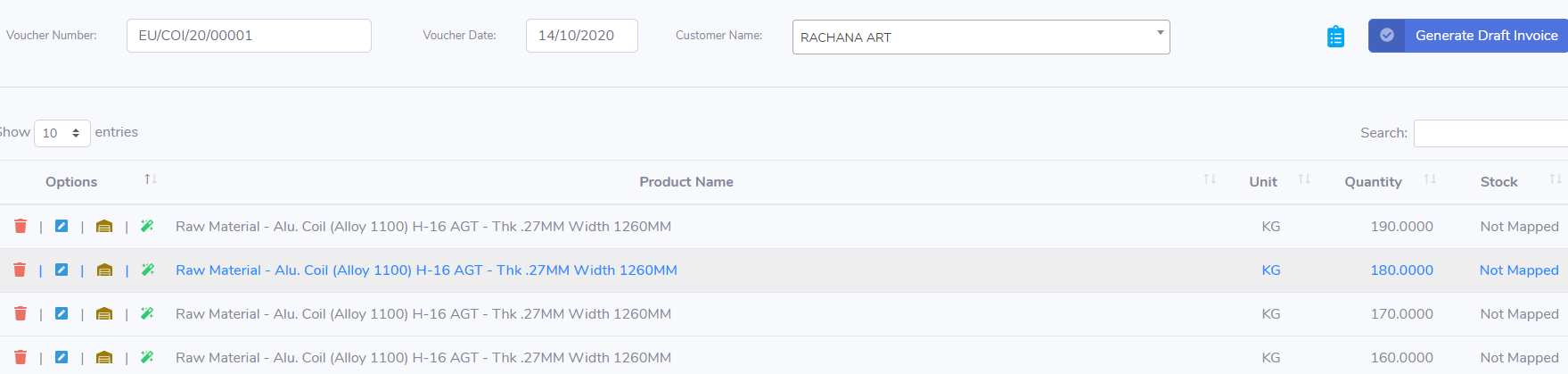
Edited by Colin - Syntax highlighting. Details on how to highlight code using markdown can be found in this guide.
This discussion has been closed.
Answers
You'll want to use the DataTables API to update the contents - otherwise DataTables won't know the new value when sorting and searching. You can use
cell.data()orrow().data()to update it - see a simple example here.Colin