
How to use checkbox on editor field with boolean values?
How to use checkbox on editor field with boolean values?
 hjohnsick
Posts: 13Questions: 5Answers: 0
hjohnsick
Posts: 13Questions: 5Answers: 0
I am using the DataTables Editor and want to use a checkbox in the editor form. The checkbox displays but the value is always 1. I want the value to be 0 when the checkbox is not selected and when it is check the value should be 1.
The last example here, https://editor.datatables.net/reference/field/checkbox, seems to be what I want but when I check the value of the checkbox it always shows the value as 1 whether it is checked or not.
    let editor = new DataTable.Editor({
        fields: [
            {
                label: 'Is Urgent',
                name: 'IsUrgent',
                type: 'checkbox',
                options: [
                    { label: 'Yes', value: 1 }
                ],
                separator: '',
                unselectedValue: 0
            },
        ],
        idSrc: 'DisplayMessageId',
        table: '#DataGrid'
    });

This question has an accepted answers - jump to answer
This discussion has been closed.
Answers
Your Screenshot shows the values you are receiving from the server, right? That is not the payload, is it? Probably something wrong with your server script?!
I use the exact same syntax as you do and this my payload of two of those fields. One checkbox is checked and the other one is unchecked:
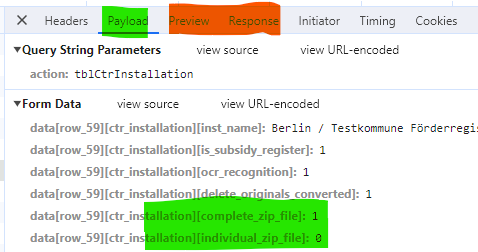
Yeah I'm not sure what the issue was but I didn't change anything and now it is working as expected...
We'll call it a win then . Good to hear it is working though, and thanks for the update.
Allan