
ColumnControl searchList doesn't see Unicode
ColumnControl searchList doesn't see Unicode
 Storms_LV
Posts: 5Questions: 1Answers: 0
Storms_LV
Posts: 5Questions: 1Answers: 0
DataTables 2.3.7,
ColumnControl 1.2.1,
Bootstrap 5.3.8
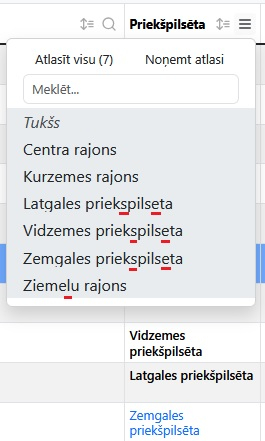
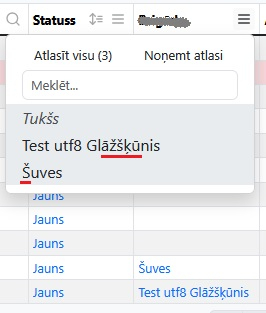
When searchList collects options from a column containing localized text (UTF8), it converts all localized characters to the corresponding Latin letter. But search is running correctly.
There is no such problem if the options are passed from the server side with ajax.
I tried different columns.type options - 'string-utf8', 'html-utf8' - nothing changes.
Here is an example of what it looks like:
Here is an example of ajax data:
This question has an accepted answers - jump to answer
Answers
Can you give me a link to a test case showing the issue please? I've just tried putting together a little example with the current releases and it seems to work without issue.
Allan
I will try to investigate the problem in more depth, including using the example you sent. And I found the problem.
I use several global parameters using the "default" property. In particular, the contents of the searchList are often modified using the orthogonal property "filter". Like this:
If I set the following default parameter, then the utf8 characters disappear:
If I specify the same parameter as
{extend: 'searchList', orthogonal: 'filter'}in every column definition where I need it, then this problem does not exist.The number of tables in the application is several dozen, so the default parameters make the work much easier.
P.S. - Data is received using ajax. Unfortunately, access to the existing code is not possible.
I would expect the result you are seeing if you set the SearchList orthogonal data point to be
filter. The reason for that is that the filtering will "normalize" the text, allowing the end user to search either with or without diacritics.If you need to add additional stuff for the display in the table, but don't want that in the SearchList, I'd suggest introduce a new orthogonal data type:
and:
DataTables does the normalization on the
filterdata type internally. You can disable that usingDataTable.util.diacritics()if you prefer that option.Allan
Yes, .orthogonal = 'searchList' helped!
Thanks for the solution!
I have slightly upgraded dataTables.columnControl.js v.1.2.1 to make it possible to search with searchList if a row column contains multiple values (array).
Currently only works if searchList values are specified manually or received in a common data array from ajax.
Where is the best place to submit this as a suggestion for an extension improvement?
Array support is something that is on my "todo" list . There are two ways it can be done - matching the full array, or taking each entry and then doing a partial match from the columns. My intention would be the latter way.
The git repo is here if you are interested in submitting a PR.
Allan
Hello again! There is a next problem...
As a result, I see that only the
type,filter,displayandsorttypes appear in the render function. TypesearchListdoes not appear. The result is searching fordata+<span>Some additional stuff</span>instead ofdata.It seems that the function accepts only types specified in the documentation. Orthogonal type is not taken into account.
At the same time, if orthogonal specifies anything other than
filter, searchList displays UTF8.The same applies to searchDropdown.
I updated Allan's test case with your code snippets and it seems to work:
https://live.datatables.net/qisomuka/3/edit
Can you provide a test case to show the issue so we can help debug?
https://datatables.net/manual/tech-notes/10#How-to-provide-a-test-case
Make sure you execute this:
before initializing Datatables.
Kevin
I started to understand where the problem was. Defaults.orthogonal only applies to populating the dropdown list. But the search process uses the type 'filter', regardless of defaults.orthogonal.
In my case, the data is received via AJAX, including searchList options [{label:"First",value:1},{label:"Second",value:2}]. In some cases, the search is not based on what is visible on the screen (e.g. Name), but on the content of the data (e.g. ID).
The 'filter' type, as allan pointed out earlier, is automatically normalized. There are situations where this is a problem. I was hoping to get around this with the defaults.orthogonal value.
It looks more like the ability to use a custom search function is needed in some cases.