
Internationalisation (from JSON file)
Internationalisation (from JSON file)
 marianidiego
Posts: 74Questions: 22Answers: 1
marianidiego
Posts: 74Questions: 22Answers: 1
in Buttons
Link to test case:
Trying this: https://editor.datatables.net/examples/simple/i18nFile.html
DataTables Version: 2.0.0 (downloaded today)
https://cdn.datatables.net/1.11.0/js/jquery.dataTables.min.js
https://cdn.datatables.net/buttons/2.0.0/js/dataTables.buttons.min.js
https://cdn.datatables.net/buttons/1.6.5/js/buttons.flash.min.js
https://cdn.datatables.net/buttons/1.6.5/js/buttons.html5.min.js
https://cdn.datatables.net/buttons/1.6.5/js/buttons.print.min.js
Error messages shown:
No error message
Description of problem:
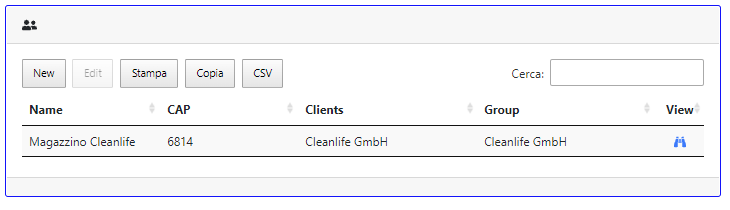
The translation works for the PRINT, COPY, CVS button, but not for the NEW and EDIT buttons.
These two buttons remain unchanged. Below is my code. What can it be?
<!-- page script -->
<script>
// Eseguo le istruzioni da : https://datatables.net/blog/2019-01-11
var fatherEditor; // use a global for the submit and return data rendering in the examples
$(document).ready(function() {
fatherEditor = new $.fn.dataTable.Editor( {
"serverSide": true,
ajax: {
url: "dist/cont/tpl_lista_location/location.php",
type: 'POST',
data: function ( d ) {
d.csrf_token = "C30ACFF5E3D34421E96D5FED43C03BABA5DC9A8A55A254FFA042882C16581366";
}
},
"table": "#example",
"fields": [
{
label: "ID:",
name: "location.location_id",
type: "readonly"
},
{
label: "ID:",
name: "location.group_of_id",
type: "hidden",
def: 2 },
{
label: "Name:",
name: "location.name",
},
/*{
label: "Group:",
type: "select",
name: "location.group_of_id"
},*/
{
label: "Clients:",
type: "select",
name: "location.clients_id"
},
{
label: "FullAddress:",
name: "location.fulladdress",
type: "textarea"
},
{
label: "CAP:",
name: "location.cap"
},
]
});
// Activate an inline edit on click of a table cell
/*$('#example').on( 'click', 'tbody td:not(:first-child)', function (e) {
fatherEditor.inline( this, {
buttons: { label: '>', fn: function () { this.submit(); } }
} );
});*/
var fatherTable = $('#example').DataTable({
"serverSide": true,
ajax: {
url: "dist/cont/tpl_lista_location/location.php",
type: 'POST',
data: function ( d ) {
d.csrf_token = "C30ACFF5E3D34421E96D5FED43C03BABA5DC9A8A55A254FFA042882C16581366";
}
},
paging: false,
columns: [
{
"class": "dtr-control",
"width": '5px',
"data": "location.location_id",
render: simple_null,
"defaultContent": ""
},
{ title: 'Name',
"data": "location.name",
"width": '150px'
},
{ title: 'CAP',
"data": "location.cap",
"width": '150px'
},
{
title: 'Clients',
"data": "clients.name",
"width": '200px'
},
{
title: 'Group',
"data": "group_of.name",
"width": '200px'
},
{
title: 'View',
class: 'dt-center',
data: 'clients.uuid_min',
width: '2.5em',
render: function ( data, type, row ) {
return '<a href="machines.php?search=@' + row.clients.uuid_min + '#' + row.location.name +'"><i class="fas fa-binoculars"></i></a>';
}
}
],
columnDefs: [
{ targets: 0, responsivePriority: 1, orderable: false},
{ targets: 1, responsivePriority: 3},
{ targets: 5, responsivePriority: 8},
{ targets: 2, responsivePriority: 20},
{ targets: 4, responsivePriority: 200}
],
buttons: [
{ extend: "create", editor: fatherEditor },
{ extend: "edit", editor: fatherEditor },
/*{ extend: 'remove', editor: fatherEditor },*/
'print', 'copy', 'excel', 'pdf', 'csv'
],
"language": {"url": "https://cdn.datatables.net/plug-ins/1.11.3/i18n/it_it.json"},
});
$(window).on('resize', function () {
fatherTable.columns.adjust();
});
});
</script>
This discussion has been closed.
Answers
That feature came in with Editor 2, see Allan's final comment on this thread. Which version of Editor are you using?
Colin
Hi Colins,
you were absolutely right.
I was using the old editor.
But now I have one last error: when I open the editor the close button is shown as follows. This happens regardless of the translation. I downloaded the latest editor today. What can it be?
Looks like a character encoding error. Are you loading everything as UTF8? If you give us a link to the page then we could take a look.
Allan
I found the error!
Instead of
<link rel="stylesheet" type="text/css" href="../../class/Editor-PHP/css/editor.dataTables.css"/>I wrote like this:
<link rel="stylesheet" type="text/css" charset="utf-8" href="../../class/Editor-PHP/css/editor.dataTables.css"/>Problem solved.
Thank you.
That will do nicely - thanks for posting back
Allan