
how to export in excel string nominal in datatable
how to export in excel string nominal in datatable
 maspratt
Posts: 2Questions: 1Answers: 0
maspratt
Posts: 2Questions: 1Answers: 0
Link to test case:
Debugger code (debug.datatables.net):
there is my code
$(document).ready(function () {
                    // Setup - add a text input to each footer cell
                    $('#tabel_data tfoot th').each(function () {
                        // $('#tabel_data tfoot tr').appendTo('#tabel_data thead');
                        var title = $(this).text();
                        $(this).html('<input type="text" placeholder="Cari ' + title + '" />');

                    });

                    // DataTable
                    var table = $('#tabel_data').DataTable({
                        language:{searchPlaceholder: "Cari Data Tagihan Pendapatan"},
                        dom: 'Blfrtip',
                        buttons: [

                                    {
                                        extend: 'excel',
                                        text: 'Export',
                                        customize: function( xlsx ) {
                                                var sheet = xlsx.xl.worksheets['sheet1.xml'];
                                            // Get reference to the worksheet and parse it to xml nodes
                                                // Has to be done this way to avoid creation of namespace atributes.
                                                var afSerializer = new XMLSerializer();
                                                var xmlString = afSerializer.serializeToString(sheet);
                                                var parser = new DOMParser();
                                                var xmlDoc = parser.parseFromString(xmlString,'text/xml');
                                                //Create header and add it to the worksheet
                                                var headerFooter = xmlDoc.createElementNS('http://schemas.openxmlformats.org/spreadsheetml/2006/main','headerFooter');
                                                sheet.getElementsByTagName('worksheet')[0].appendChild(headerFooter);
                                                var nodeHeaderFooter = sheet.getElementsByTagName("headerFooter");
                                                //Creation of the header
                                                var oddHeader = xmlDoc.createElementNS('http://schemas.openxmlformats.org/spreadsheetml/2006/main','oddHeader');
                                                nodeHeaderFooter[0].appendChild(oddHeader);
                                                var nodeOddHeader = sheet.getElementsByTagName("oddHeader");
                                                var txtHeader = "&L"+"&F - &A"+"&R"+"&D - &T";
                                                var nodeHeader = xmlDoc.createTextNode(txtHeader);
                                                nodeOddHeader[0].appendChild(nodeHeader);
                                                //Creation of the footer
                                                var oddFooter = xmlDoc.createElementNS('http://schemas.openxmlformats.org/spreadsheetml/2006/main','oddFooter');
                                                nodeHeaderFooter[0].appendChild(oddFooter);
                                                var nodeOddFooter = sheet.getElementsByTagName("oddFooter");
                                                var txtFooter = "&R"+"Page &P of &N";
                                                var nodeFooter = xmlDoc.createTextNode(txtFooter);
                                                nodeOddFooter[0].appendChild(nodeFooter);
                                                //Add header and footer to the worksheet
                                                sheet.getElementsByTagName('worksheet')[0].appendChild(headerFooter);
                                            },
                                    }
                                ],


                        initComplete: function () {
                            // Apply the search
                            this.api()
                                .columns()
                                .every(function () {

                                    var that = this;

                                    $('input', this.footer()).on('keyup change clear', function () {
                                        if (that.search() !== this.value) {
                                            that.search(this.value).draw();
                                        }
                                    });
                                });
                            },
                        });
                        $('#tabel_data tfoot tr').appendTo('#tabel_data thead').hide();
Error messages shown:
Description of problem:
I can already export using the default datatable plugin to export to excel but when exporting it looks like there is a depreciation of numbers, for example there is 1000 or 1,000 exported data when in excel it changes to just 1 without any commas or dots, what do you think is the solution?
Is there something wrong with my code, please enlighten me
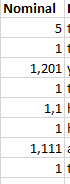
that should be
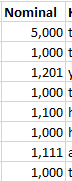
Edited by Colin - Syntax highlighting. Details on how to highlight code using markdown can be found in this guide.
This discussion has been closed.
Answers
Are the commas thousand separators, or your decimal separator?
We're happy to take a look, but as per the forum rules, please link to a test case - a test case that replicates the issue will ensure you'll get a quick and accurate response. Information on how to create a test case (if you aren't able to link to the page you are working on) is available here.
Colin
i want separator in decimal,
how to change it, the data is taken from api
As Colin said, we'll need a test case showing the issue so we can dig into this further.
Allan